Bioinformatics Software, Built in Bangladesh.
The tools we build for our own work, given away for academic research. Desktop software that runs on your own computer, with the methods written down and the numbers published so you can check them.
 View full size
How we build these
It runs on your computer
Desktop software, not a web service. Your structures and results stay on your own machine, and nothing stops working when a server goes down or a subscription lapses.
The numbers are published
Where we claim an accuracy, the benchmark that produced it is published with the per-case data, so the figure can be recomputed rather than taken on trust.
Free for academic work
Free for academic, nonprofit, educational and personal research, with no account to make. Commercial use needs written permission first.
Available now
DawnDock
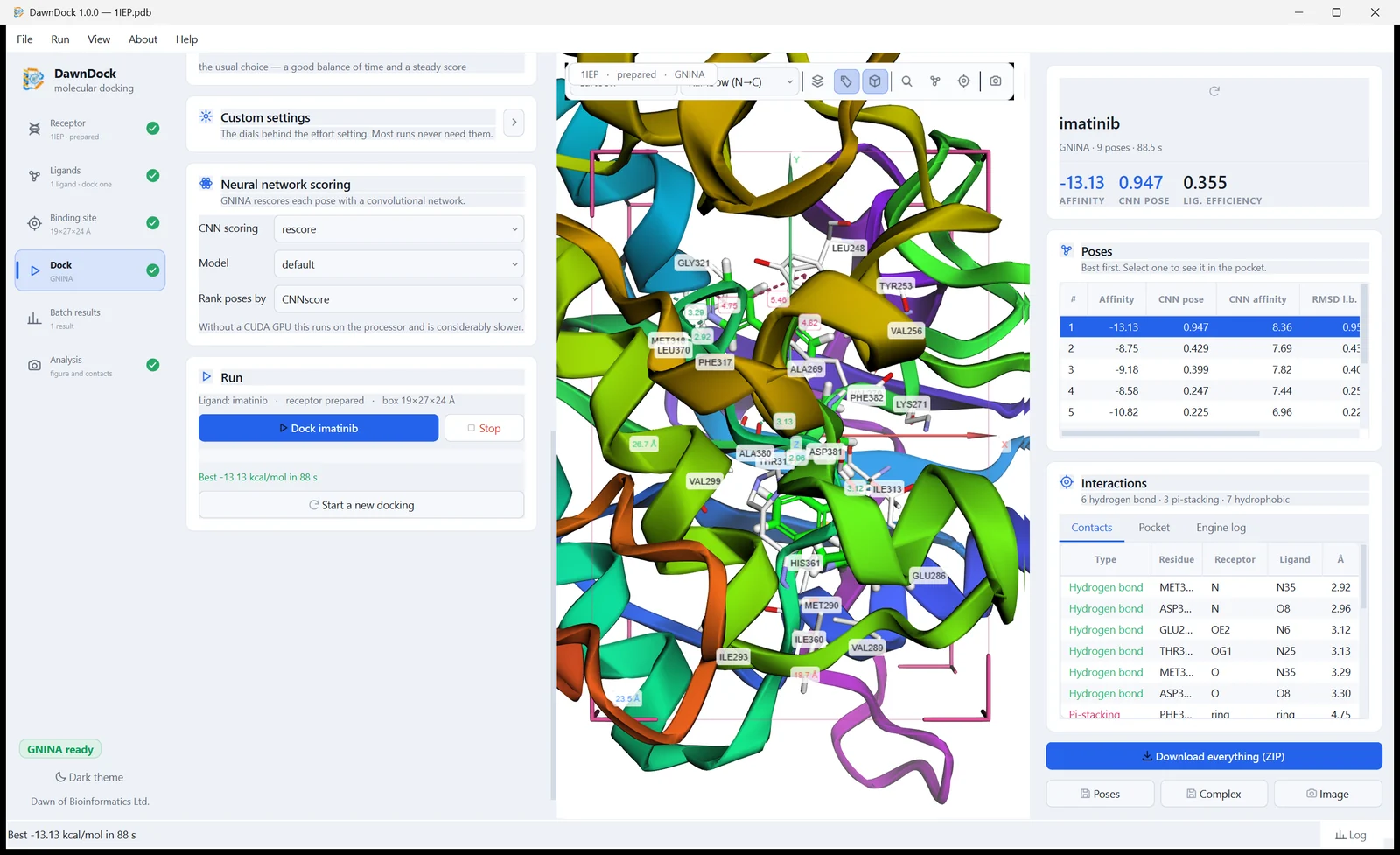
Version 1.0.1Molecular docking and virtual screening, without the command line. Five docking engines behind one window — GNINA, Smina, AutoDock Vina, AutoDock 4 and LeDock — with poses scored by a neural network trained on solved crystal structures, not only by a classical scoring function. Receptor and ligand preparation, pocket finding, batch screening, interaction analysis and publication figures are all part of it.
More tools are coming
DawnDock is the first. If there is something you need for your own work, tell us what it is.
Suggest a toolWhy we built it
Docking is routine work, but the tooling is not. The engines are Linux command-line programs, the preparation steps are scattered across half a dozen utilities, and the answer arrives as a text file. That is a day of setup before a student runs anything.
One window, in work order
Receptor, ligands, binding site, dock, results, analysis — the six steps run down the side and tick off as you go, so it is always clear what is still missing.
Nothing to set up
Two engines are bundled and work the moment you install. No Python, no compiler, no toolkit, and no administrator password.
Dock fast, then rescore
Dock with a fast classical engine, then rescore the promising poses with the neural network — about nine seconds for five poses, and both sets of numbers stay on screen.
Your files stay with you
Docking runs on your machine and your structures are never uploaded. The network is used only to fetch a PDB you asked for, to add an optional engine, or to check for an update.
It shows its working
Every run writes its config and the exact command line beside the results, so the same calculation can be repeated outside DawnDock, or by a reviewer.
Citable
The release is archived with a DOI, so a paper can point at the exact version its results came from, and the citation is inside the program.
Using a DOBTool in your research
Each release is archived with its own DOI, so you can cite the exact version you ran. DawnDock 1.0.1:
Ahmed, S. F. (2026). DawnDock: a multi-engine GUI application for molecular docking with deep learning scoring (Version 1.0.1) [Computer software]. Zenodo. https://doi.org/10.5281/zenodo.24198678
Need a hand?
Questions about using our tools, problems, and commercial licence enquiries all go to the same address. For DawnDock, the user manual and the questions people ask cover most of it already.