Molecular docking and virtual screening, without the command line.
Five docking engines behind one window. Load a protein, find the pocket, dock a
ligand or a whole library, then read the poses, scores and contacts in a 3D view
and export the lot. One of the engines scores poses with a neural network trained
on solved crystal structures.
Free for academic, nonprofit, educational and personal research.
Commercial use needs written permission first. DawnDock is licensed, not sold,
and it is not open source.
You will be asked for your name, your institute and your email first, so
that we can tell you when a new version is out.
On this page
Overview
What DawnDock does
DawnDock takes you from a raw structure file to ranked, inspected docking poses on
your own computer. Everything happens in one window, in the order the work actually
happens: receptor, ligands, binding site, dock, results, analysis. There is no
command line to learn and nothing to install beside it.
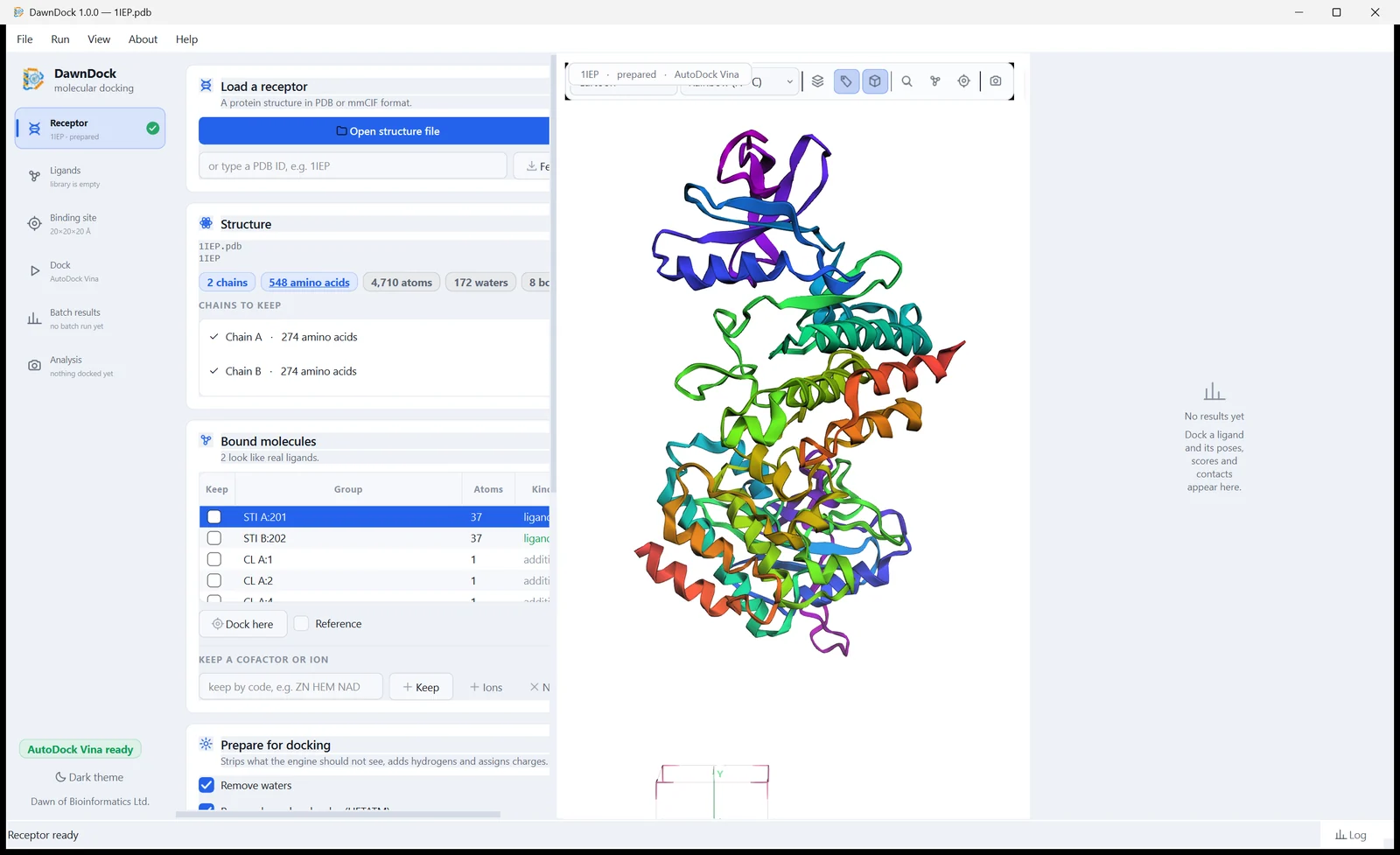
Receptor. Open a PDB or mmCIF file, or fetch one from the RCSB by its ID. Chains, amino acids, waters and bound molecules are counted and listed, and before anything is prepared DawnDock spells out what will be removed and what will stay.
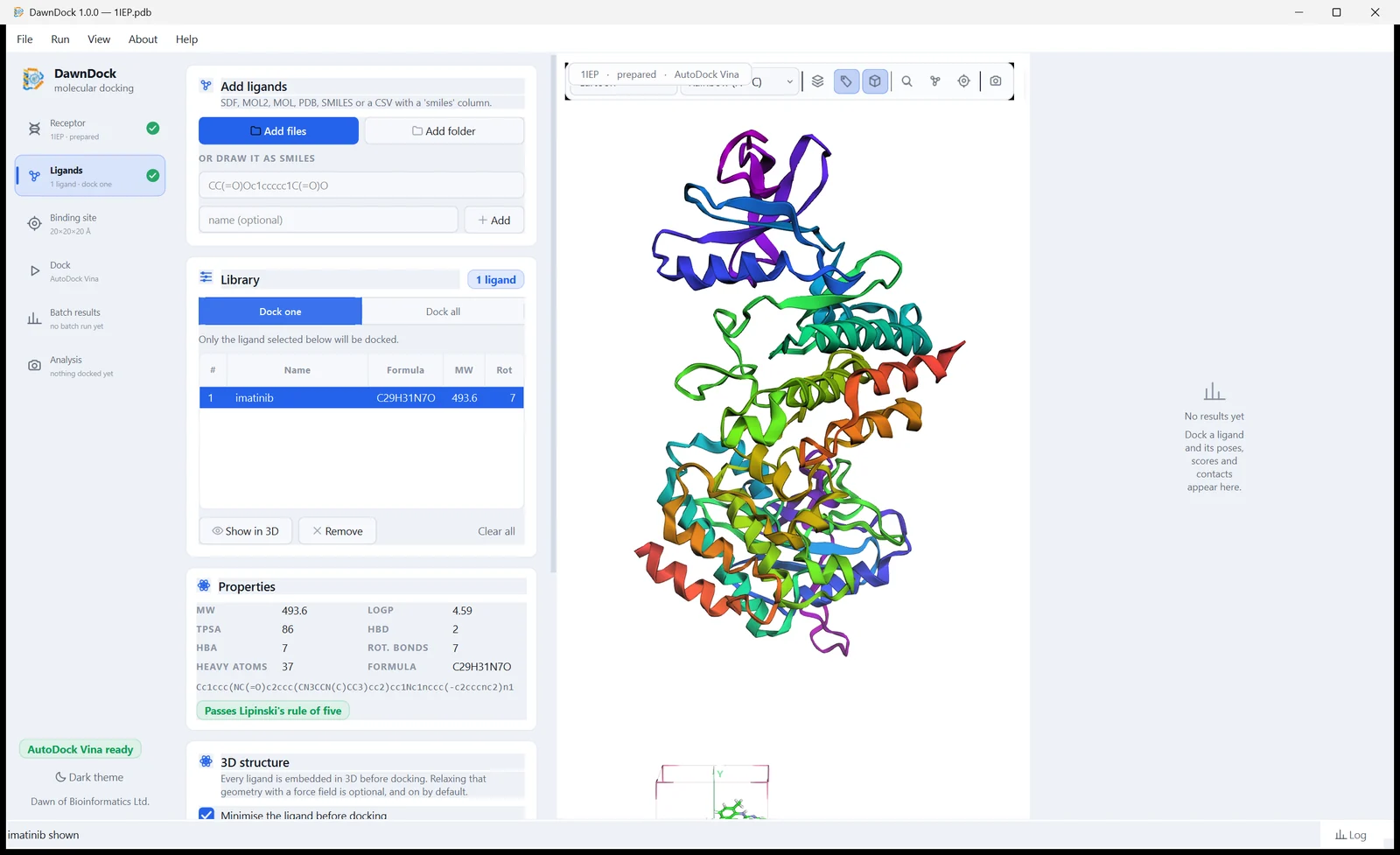
Ligands. Add ligands from SDF, MOL, MOL2, PDB or SMILES files, a CSV table, or a SMILES string typed straight in. Each one is built in 3D, with its molecular weight, LogP, TPSA and Lipinski check worked out for you.
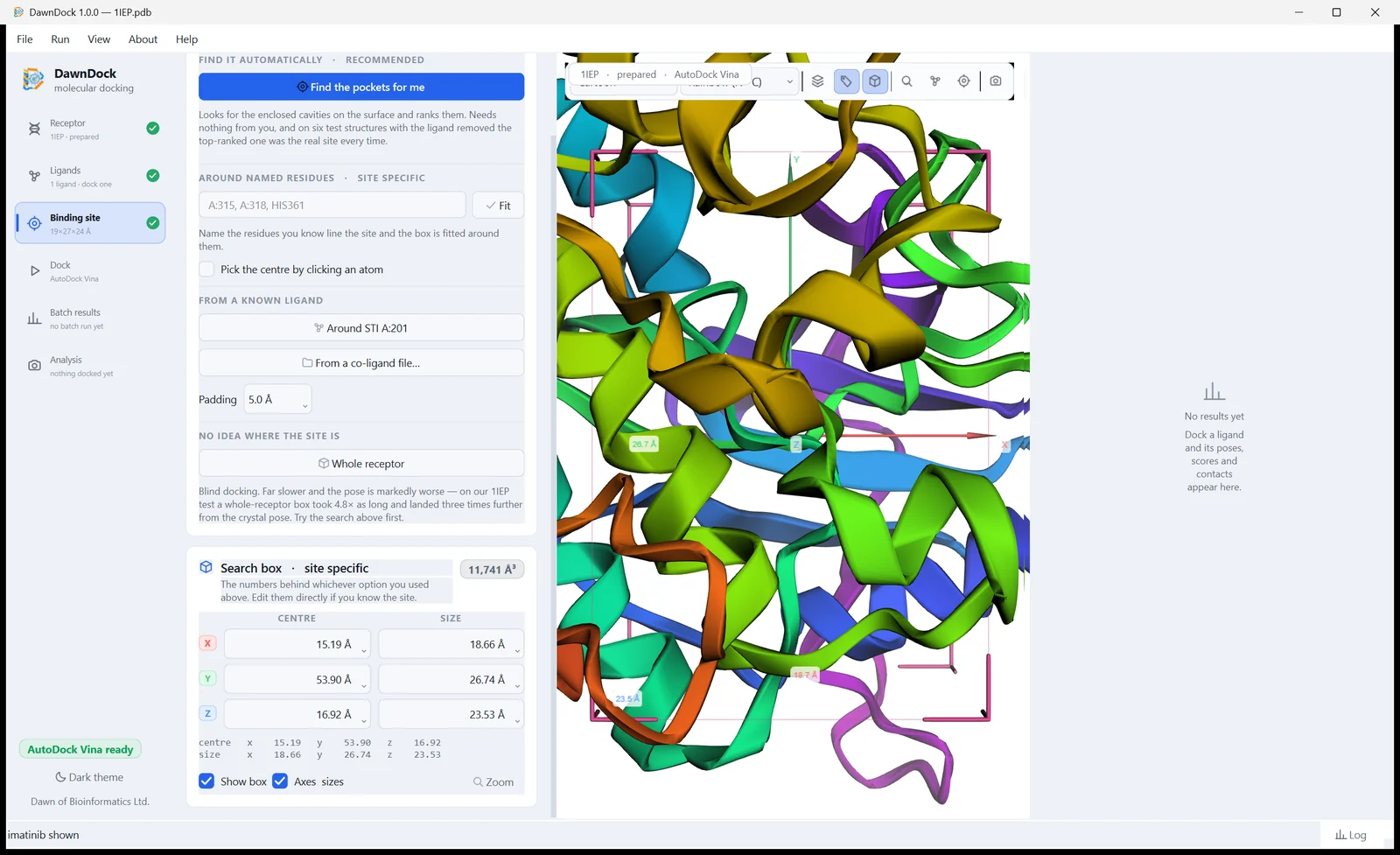
Binding site. Put the search box around a bound ligand, around named residues, on an atom you click, or let DawnDock find the pockets for you. The centre and size are shown as numbers you can edit.
Dock. Choose one of the five engines, set how hard it should search, from Quick look to Thorough, and dock. Progress is live, and any run can be stopped at once.
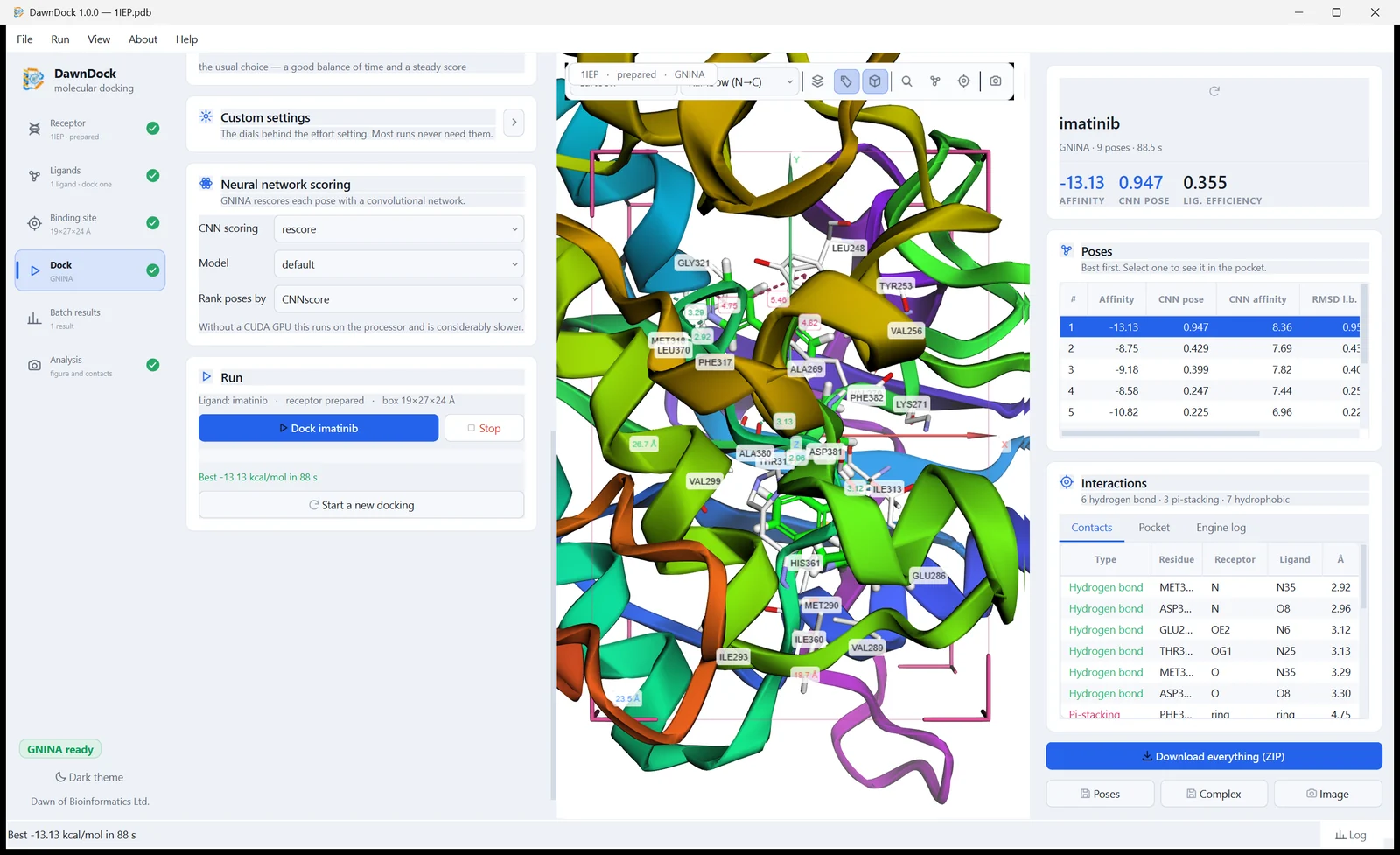
Results. Poses are listed best first. GNINA's CNN pose score sits beside the engine's affinity, and every hydrogen bond, pi-stacking and hydrophobic contact is listed by residue and distance.
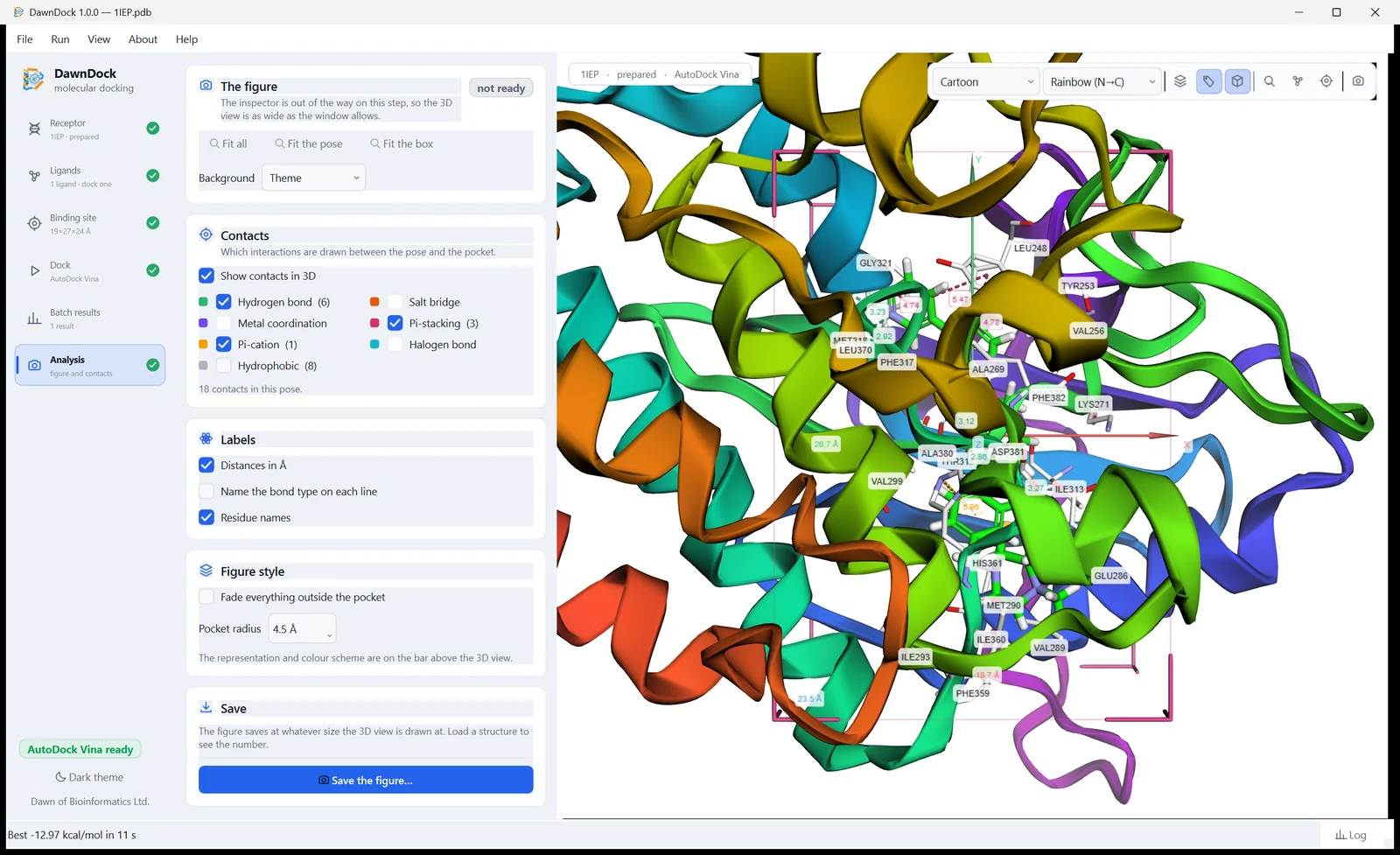
Analysis. The figure step. Choose which contacts and labels to draw, switch to a white background for a journal, and save the picture at the size it is drawn.
Receptor preparation
Open PDB or mmCIF, or fetch a structure from the RCSB by its four-letter ID.
Remove waters, choose which bound molecules to keep, add hydrogens at a pH you
pick, and write the PDBQT. Nothing is removed without saying so first.
Ligand preparation
SDF, MOL, MOL2, PDB, SMILES files and CSV tables, or a SMILES string typed in.
3D coordinates from RDKit, a force-field clean-up, and molecular weight, LogP,
TPSA and Lipinski violations shown for whichever ligand you pick.
Finding the binding site
Set the box around named residues, around a bound ligand, by clicking an atom,
or let DawnDock find the pockets for you. On six test structures the pocket
search put the box on the right site every time.
Batch screening
Load a library, press start, and come back to a ranked table. A score
distribution above it tells you whether anything in the library is actually
good, or whether everything scored the same and the run says nothing.
Interactions, measured
Hydrogen bonds, salt bridges, metal coordination, pi-stacking, pi-cation,
halogen bonds and hydrophobic contacts, each listed with its residue and
distance and drawn into the 3D view.
Figures and exports
A dedicated step for the figure, with a white background for journals. One
button writes a ZIP holding every pose, the scores as CSV, the receptor-plus-pose
complexes ready for PyMOL, and the log and config of every run.
Docking engines
Five engines, one window
Pick an engine on the Dock step, or run the same target through several and compare.
They are listed best first, by how often each one puts the ligand where the crystal
structure says it goes. Speed runs almost exactly the other way, so the one at the
top is also the slowest.
Two of the five are ready the moment you install
AutoDock Vina and AutoDock 4 are included and work immediately
— open a structure, dock, make a figure. Smina, GNINA and LeDock are
Linux-only programs: they run through WSL, and DawnDock fetches and sets
them up for you from inside the program when you ask for them. If WSL is missing
it offers to install it, and says plainly that the two bundled engines work
without it.
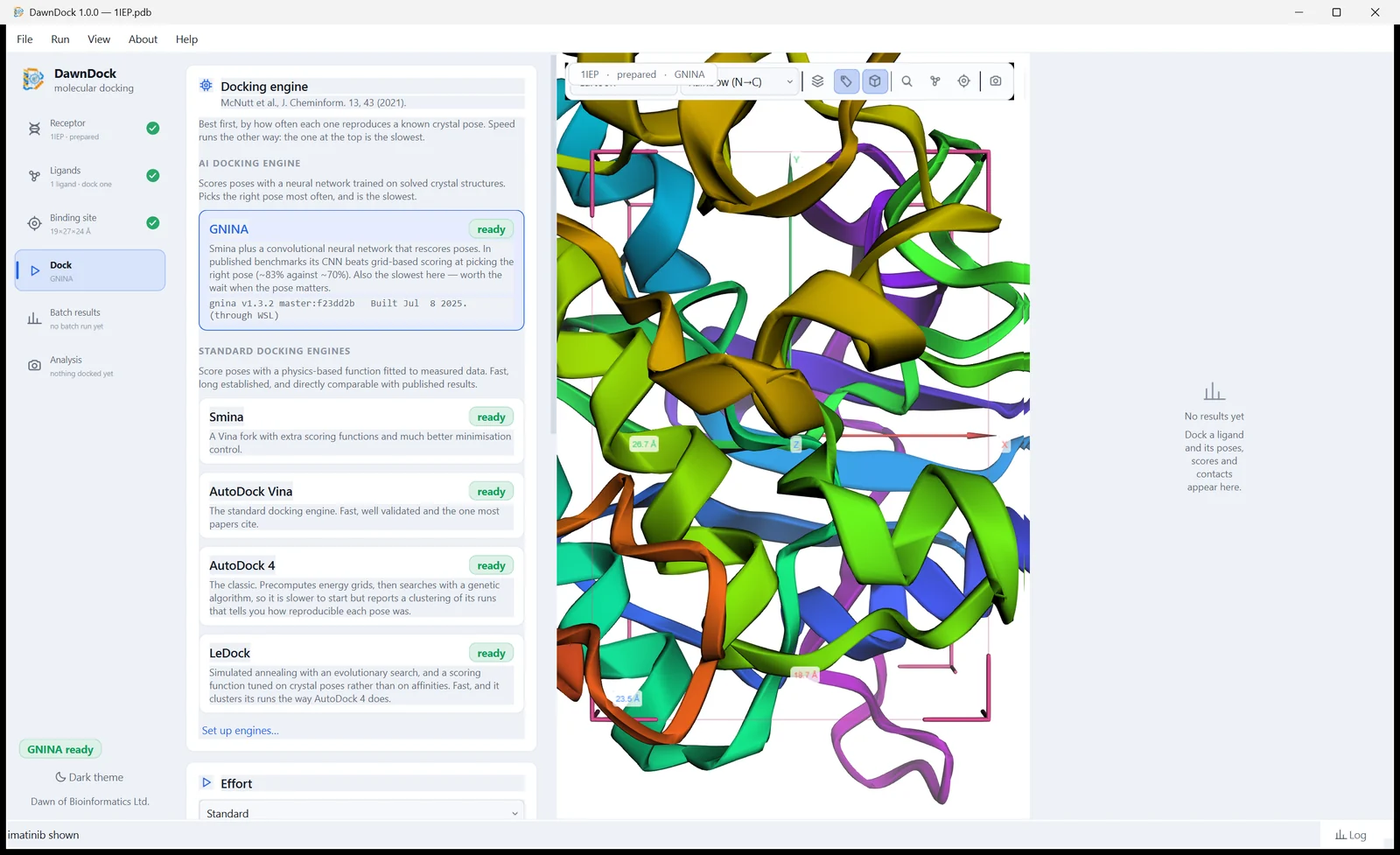
AI docking engine
Learns what a correct pose looks like from thousands of solved structures, and scores poses with that network.
GNINANeural networkNeeds WSL
Smina plus a convolutional neural network that rescores every pose it
generates, reported as a CNN pose score and a CNN affinity. It is the slowest
engine here, and the one to reach for when getting the pose right matters more
than finishing quickly. It always runs on the processor, so no graphics card
is needed.
Right pocket
98.8%
Median error
0.94 Å
Version
1.3.2
Best of the five80.5%of top poses within 2 Å of the crystal pose, on the Astex Diverse Set
Standard docking engines
Add up physical terms — sterics, hydrogen bonds, hydrophobic contact, torsional strain — with weights fitted to measured data. Far faster, and directly comparable with the published literature.
2SminaNeeds WSL
A fork of AutoDock Vina with extra scoring functions and far finer control over
minimisation. Its Vinardo function poses better than stock Vina.
3AutoDock Vinav1.2.7Included
The standard engine, and the baseline the others are measured against. Fast,
well validated, the one most papers cite, and the quickest of the five.
4AutoDock 4v4.2.6Included
The classic. Precomputed energy grids searched by a genetic algorithm, so it is
much slower, but it reports a clustering of its runs that tells you how
reproducible a pose was — something none of the others can.
5LeDockv1.0Needs WSL
A different lineage entirely: simulated annealing with an evolutionary search,
and a scoring function fitted to crystal poses rather than affinities. When it
agrees with Vina you have two independent opinions. Academic use only.
Not sure which to pick?
Dock with AutoDock Vina for a fast answer, then press Rescore with
GNINA on the poses worth a closer look. Rescoring takes the poses already
found and scores them again with the network, without searching the box a second
time — about nine seconds for five poses, against seventy for a full GNINA run. You
get the speed of one engine and the judgement of the other, and both sets of
numbers appear side by side rather than one quietly replacing the other.
View full size
The Dock step. Each engine says whether it is ready, and the two groups are kept apart because the distinction is a real one.Validation
How accurate is it
Every engine was run over the whole Astex Diverse Set — 85 crystal
structures, each ligand rebuilt from its published SMILES, one box rule for all of
them, and DawnDock's own default settings. A redocking error under 2 Å is the usual
criterion for a correct result.
Astex Diverse Set, run in this project. "Right pocket" means the pose landed on the correct site even when the orientation was off.
Engine
Top pose under 2 Å
Best of 3
Right pocket
Median error
GNINA (neural network)
80.5%
90.2%
98.8%
0.94 Å
Smina
56.1%
72.0%
87.8%
1.71 Å
AutoDock Vina
52.4%
72.6%
88.1%
1.75 Å
AutoDock 4
52.4%
62.2%
84.1%
1.83 Å
LeDock
50.0%
63.1%
79.8%
1.99 Å
Neural-network scoring placed 80.5% of ligands within 2 Å of the
crystal pose, against 52.4% for a classical scoring function on the
same structures, with the same boxes and the same ligand preparation. More than half
of GNINA's answers land under 1 Å.
Read it as a starting point, not a verdict
This compares the engines DawnDock ships against each other. It is not a comparison
with any other docking program. On your own target the order can differ, and
running two engines and comparing them is worth more than trusting any one of them.
An engine's affinity is a scoring-function estimate, not a measured binding free
energy. These functions rank and pose reasonably well; they do not predict potency
reliably. Virtual screening has not been benchmarked here — the figures above are
redocking accuracy, which is a different question from ranking actives against
decoys.
Every pose, score and RMSD behind this table is published, one file per engine, so
the numbers can be recomputed rather than taken on trust:
the per-complex data on GitHub,
and the full write-up in the archived record on Zenodo.
Before you start
What you need
Requirement
Minimum
Recommended
Operating system
Windows 10, 64-bit
Windows 11, 64-bit
Processor
4-core CPU
8-core CPU (for GNINA)
Memory
4 GB RAM
8 GB RAM
Disk
128 GB
256 GB SSD
Graphics card
Not needed
Not needed
How much space DawnDock itself takes
About 1 GB: the installer is 298 MB and unpacks to roughly
740 MB. Adding the three optional engines through WSL needs several GB more,
most of it GNINA, so the drive sizes above leave room for that and for your own
structures and results.
No administrator rights
DawnDock installs for you alone, into your own user folder, so Windows never asks for a password.
Nothing else to install
No Python, no compiler, no separate toolkit. Everything the program needs is inside the installer.
No internet needed to dock
Only to download the installer, to fetch a structure from the RCSB by ID, to check for updates, or to add the optional engines.
Installing
Four steps, and an optional fifth
1
Download the installer
Use the Download for Windows button. You will get DawnDock-Setup-1.0.1.exe, about 298 MB.
2
Run it
Double-click the file. Windows will not ask for an administrator password, because DawnDock installs into your own user folder.
3
If Windows warns you about the publisher
You will probably see “Windows protected your PC”. Choose More info, then Run anyway. This appears because DawnDock is not yet signed with a paid code-signing certificate, not because anything is wrong with the file. If you would rather check the download first, the next section shows you how.
4
Open DawnDock
A Start-menu entry and an optional desktop shortcut are created, and an uninstaller is registered, so removing it later works from Settings → Apps like any other program. The first launch shows a splash screen while the 3D view and the chemistry toolkits load.
At this point AutoDock Vina and AutoDock 4 are ready. You can open a structure, prepare it, dock and make your figure without doing anything else.
5
Optional: add GNINA, Smina and LeDock
These three are published only as Linux programs, so they run through
WSL (Windows Subsystem for Linux). You need this step only if
you want them — and GNINA, the neural-network engine, is one of them.
Open Run → Docking engines (Ctrl+E). The dialog says what WSL
is, shows what your machine already has, and fetches and sets up each engine
for you, then runs it once to prove it works. Nothing needs
pip, curl or a password.
If WSL is not installed yet
The same dialog offers to run it for you. Doing it by hand instead is one command
in an administrator PowerShell, followed by a restart:
wsl --install
It needs administrator rights, a restart, and virtualisation switched on in your
machine's BIOS or UEFI. If that setting is off, no program can turn it on, and the
dialog tells you so rather than failing quietly.
GNINA is a CUDA build, so its download is large — the binary and the libraries it
names come to several GB, fetched in one step. It still runs on the processor
afterwards, with no graphics card needed.
Trust
Checking your download
Every release is published with two small files beside the installer: a SHA-256
checksum, and an Ed25519 signature over that checksum made with the author's private
key. A matching checksum tells you the download is intact. A valid signature tells
you who made it. Both are independent of Windows' own publisher check.
The script carries the public key, so it needs nothing else. It prints the key's
fingerprint on every run so you can compare it against the copy published in the
repository:
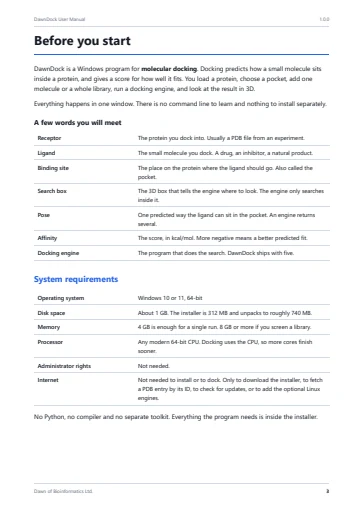
Everything from installing to reading a result, in one PDF. Its screenshots come from
the running program rather than a mock-up, so what you see on the page is what you
will see on your screen.
34 pages
PDF · about 10 MB
English
Version 1.0.1
1
Before you startRequirements, installing, and the file formats you can use.
2
Part 1 · Quick RunTen steps from opening the program to saving a result, one action and one picture per step.
3
Part 2 · Detailed GuideEvery panel and setting, from the receptor to the figure, with numbered call-outs on each screenshot.
4
TroubleshootingWhat a message means, and what to do when an answer looks wrong.
Yes, for academic, nonprofit, educational and personal research.
There is nothing to pay and no account to make.
Commercial use — by companies, or for paid services, consulting
or commercial R&D — needs written permission first. Write to
dawn.of.bioinformatics@gmail.com.
DawnDock is licensed rather than sold, and it is not open source. You may publish
what you find; please cite it.
Windows blocked the installer. What do I do?
Choose More info, then Run anyway. Windows shows
this for any installer that is not signed with a paid code-signing certificate,
which DawnDock is not yet.
Not to use DawnDock. AutoDock Vina and AutoDock 4 are included as
Windows programs, and everything around them — preparation, the 3D view,
interaction analysis, batch docking, the figures and every export — is part of
DawnDock itself. On a machine that has never heard of WSL you can open a
structure, prepare it, dock and make your figure.
WSL is only needed for the three Linux-only engines: Smina, GNINA and LeDock. The
engine dialog explains what WSL is, offers to install it for you, and says
plainly that the bundled engines work right now without it.
Do I need an NVIDIA graphics card for the AI engine?
No. GNINA always runs on the processor in DawnDock, deliberately, so there is no
CUDA driver to get wrong and no class of failure that only appears on some
machines. It costs speed: measured on a laptop with no CUDA at all, GNINA docked
imatinib into Abl kinase in about 70 seconds, and rescoring five existing poses
took 9 seconds.
Which file formats does it read?
Receptors: PDB and mmCIF, gzipped or not, or fetched from the
RCSB by its four-character ID.
Ligands: SDF, MOL, MOL2, PDB, SMILES files and CSV tables with a
SMILES column, or a SMILES string typed straight in.
What comes out: poses as SDF and in the engine's own format,
receptor-plus-pose complexes as PDB ready for PyMOL, every score as CSV, PNG
figures, and one ZIP holding all of it with the logs and configs.
Does my structure get uploaded anywhere?
No. Docking runs on your own computer, and your structures and ligands are never
sent anywhere. DawnDock uses the network for three things only, all of them at
your request: downloading a structure from the RCSB when you type a PDB
ID, downloading the optional engines, and checking whether a newer version has
been published.
Does it run on macOS or Linux?
Not yet. Version 1.0.1 is a Windows application, built and tested on Windows 10
and 11, 64-bit.
Why does the same ligand sometimes score differently?
Docking engines search at random, so in general they can. DawnDock pins the
random seed, so docking the same ligand twice with the same settings gives
exactly the same answer. The one exception is LeDock, which exposes no seed at
all; across five repeats of the same run its scores spanned about 0.25 kcal/mol,
and the Dock step says so on its card rather than leaving you to discover it.
Something went wrong. What should I send?
Open Help → Copy diagnostics. It puts the version, your results
folder, every engine it found with its version, and anything that would not
start onto the clipboard. Paste that into your message.
If the program closed unexpectedly there is also a log at
%APPDATA%\DawnDock\crash.log. Attach it, say what you were doing,
and share the structure and ligand if you are able to — that helps most of all.
Citing
How to cite DawnDock
If DawnDock helped with work you publish, please cite it:
Ahmed, S. F. (2026). DawnDock: a multi-engine GUI application for molecular
docking with deep learning scoring (Version 1.0.1) [Computer software].
Zenodo. https://doi.org/10.5281/zenodo.24198678
That DOI belongs to this exact version and never moves, so a paper points at the
code that produced its results. Cite the version you actually ran. This is the
wording Zenodo gives for the record itself. The program's own
About window, where the citation can be copied
straight out, and
CITATION.cff
name Dawn of Bioinformatics Ltd. as the publisher instead of Zenodo.
Both forms are accepted; use whichever your journal prefers.
A link that stays current
Zenodo also gives DawnDock one DOI that covers every version and always resolves
to the newest:
10.5281/zenodo.24185576.
Use it where you mean the software in general — a bookmark, a link from a website,
a software list — because it will not go stale when the next version comes out. In
a paper, use the version DOI above instead: a reader needs to know which version
produced the results, and this one will point at a later release than the one you
ran.
Please also cite the engine you used
DawnDock runs these programs; it does not replace them, and their authors deserve the
credit. The manual lists the full references, and so does the program's About window.
AutoDock Vina
Eberhardt, J., Santos-Martins, D., Tillack, A. F. & Forli, S. J. Chem. Inf. Model.61, 3891–3898 (2021). Trott, O. & Olson, A. J. J. Comput. Chem.31, 455–461 (2010).
AutoDock 4
Morris, G. M. et al. J. Comput. Chem.30, 2785–2791 (2009).
Smina
Koes, D. R., Baumgartner, M. P. & Camacho, C. J. J. Chem. Inf. Model.53, 1893–1904 (2013).
GNINA
McNutt, A. T. et al. J. Cheminform.13, 43 (2021).
LeDock
Zhao, H. & Caflisch, A. Bioorg. Med. Chem. Lett.23, 5721–5726 (2013). Wang, Z. et al. Phys. Chem. Chem. Phys.18, 12964–12975 (2016).
Help
Support
DawnDock is made in Bangladesh by Dawn of Bioinformatics Ltd. Questions about using
it, problems, and commercial licence enquiries all go to the same address.
Write to us
Include the diagnostics text from Help → Copy diagnostics if you are reporting a problem.